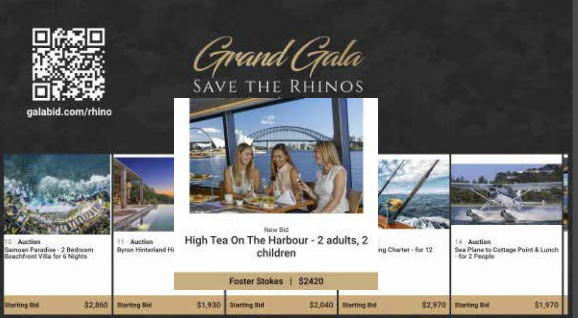
Most fundraising events have screens.
A logo on a slide, maybe a video at the start of the night, perhaps an acknowledgement of sponsors. And then the screens go dark for most of the evening while the fundraising happens elsewhere.
This is one of the most consistent missed opportunities in event fundraising. Your screens are prime real estate for the entire evening, and a well-configured fundraising leaderboard turns them from decorative elements into active revenue drivers that work continuously in the background while your team focuses on guests.
This piece is about how to use a leaderboard strategically, not just what to put on it. The difference is meaningful. An organiser who understands why certain leaderboard elements drive giving will make better decisions about what to show, when to show it, and how to brief their MC to use what is on screen to raise more on the night.
Why a Leaderboard Raises More Money: The Psychology Behind It
Before getting into the specifics of what to display and when, it is worth understanding why visible fundraising data affects behaviour.
Humans are highly influenced by what other people around them are doing. When guests can see that bidding is active, that donations are coming in, and that a total is climbing, they receive a social signal that this is what people like them do in this room tonight. Participation becomes the norm rather than the exception, and those on the fence are nudged toward joining in.
Visible progress toward a goal triggers a different but equally powerful motivation. When people can see that a target is 60% achieved, they feel the pull of completion. The remaining 40% feels like a gap that can be closed with their contribution. This is why fundraising thermometers consistently outperform abstract asks. The visual makes the gap concrete and makes the contribution feel purposeful.
Urgency also drives giving. A countdown timer in the final minutes before an auction closes produces a measurable spike in bids. Guests who were passively watching suddenly face a deadline, and many act on impulse in a way they would not have if the close had felt distant.
And individual recognition matters. When a new bid or donation appears on screen with the donor's name attached, it creates a moment of visibility that many guests find motivating either because they want their own moment of recognition or because they respond to seeing their peers lead.
GalaBid's leaderboard is built around all of these dynamics. Every element, from the total raised counter to the pop-up notifications to the countdown timer, has a specific psychological function. Understanding that function lets you deploy each one at the right moment.
What to Put on Your Leaderboard and Why
The total raised counter
This is the heartbeat of your leaderboard and should be visible at all times. A live running total that climbs in real time throughout the evening creates a continuous sense of momentum. Guests who glance at the screen during dinner and see the number has jumped since they last looked feel the energy of the night even when nothing specific is being announced from the stage.
Set your total raised counter to capture all revenue across all activities, or configure it to show specific streams depending on what you want to highlight at each point in the evening. During the paddle raise, for example, showing the donation-specific total makes each pledge feel more directly connected to the goal.
The fundraising thermometer
A thermometer visualising progress toward your goal is one of the single most effective tools on the leaderboard. It makes your target tangible and makes the gap between where you are and where you want to be visible to every person in the room.
The thermometer works best when the goal itself is specific and the audience understands what achieving it means. "We need $30,000 to fund our mentorship programme for the year" tied to a thermometer filling toward $30,000 is far more motivating than an abstract revenue target. When the thermometer is at 75% and the MC says "we are $7,500 away from fully funding our programme tonight," the ask lands with urgency and meaning.
In GalaBid you can configure the thermometer to track total funds raised, donations only, or a specific subset of your campaign items. You can also customise the visual, replacing the default thermometer with your organisation's branding or an image that reinforces the cause.
Pop-up activity notifications
Real-time pop-up notifications on the leaderboard, showing new bids placed, donations made, and raffle tickets purchased, perform two functions simultaneously. They keep the room informed about what is happening in the auction, and they provide social proof that other people are actively participating.
The key is calibration. At a busy event with high bidding activity, continuous pop-ups maintain energy and show that the room is engaged. At a quieter event where bidding has slowed mid-evening, pop-ups can highlight the activity that is happening rather than the lull.
GalaBid's leaderboard allows you to show or hide different notification types depending on your preference. If your campaign includes items with sensitive bid amounts, you can choose to show that a bid has been placed without displaying the specific amount or bidder name.
The countdown timer
The countdown timer is your most powerful tool for generating urgency, and its effect is sharpest in the final minutes before an auction closes.
Used too early in the evening, a countdown can create anxiety rather than urgency, particularly if guests feel the night is ending when it has barely started. Used strategically in the final ten to fifteen minutes of the silent auction, it generates a concentrated burst of bidding activity as guests who were watching suddenly feel the pressure of a real deadline.
Brief your MC to call attention to the countdown at the right moment. "Twelve minutes left to place your bids, grab your phone if you haven't checked in a while" said when the timer is visible on screen is far more effective than a vague announcement that the auction is closing soon.
The timer also works well in more targeted moments: a short timer on a specific donation window during the paddle raise, or a flash timer during a live auction lot that is attracting attention.
Auction item display and bid activity
A scrolling or grid display of your silent auction items with current highest bids serves two purposes. It reminds guests of items they may have forgotten to bid on, and it surfaces competitive activity that may prompt guests who have been outbid to return and rebid.
Items with active bidding and high current bids draw attention to themselves and create a secondary social proof effect: if multiple people are competing for something, it must be worth having. Your best-performing items become more visible, which tends to generate even more bidding.
If you have a large catalogue, showing only a subset of items, perhaps the top ten by current bid, or filtering to the items closing soonest, keeps the display focused and readable rather than overwhelming.
Sponsor logos and cause imagery
Between active fundraising moments, the leaderboard is the ideal vehicle for sponsor recognition and cause communication. Custom backgrounds, rotating banner images, sponsor logos, and photography or video stills from your cause all fill the screen with content that reinforces why people are there and who has made the event possible.
This is not just aesthetic. A guest who looks up from a conversation and sees a photograph of the people their donation will help is given a visual reminder of the evening's purpose. That kind of ambient reinforcement throughout the event subtly sustains giving motivation in a way that a single speech or video cannot.
GalaBid's leaderboard builder lets you customise backgrounds, add logos, embed images, and create the visual environment that matches your event branding. The display is fully customisable to look like an extension of your event rather than a generic data screen.
When to Use Each Element: A Room-by-Room Guide
The most effective leaderboard strategies treat the screen as a programme element with its own arc across the evening, not a static display that runs unchanged from start to finish.
Arrival and pre-dinner drinks
During this window, the leaderboard should be welcoming and informative. Show the campaign name and QR code so guests can register and start browsing before they sit down. Include a total raised counter that starts updating from the moment pre-event bids come in. Light sponsor branding keeps the screen active and professional while guests settle.
If you opened pre-event bidding before the night, some of your total raised counter will already be climbing when guests walk in. This is a powerful psychological start. Guests who arrive to see that $8,000 has already been raised before dinner begins feel that they have joined a successful evening, which primes them to participate.
Dinner service and silent auction
This is the sustained middle period where the leaderboard's job is to keep energy alive without demanding constant attention. The item display with live bids, the total raised counter, and activity pop-ups all serve this function.
The MC should reference the screen regularly during this period, calling out hot items, acknowledging notable bids, and encouraging guests to check their phones. Each MC callout should be tied to something specific on the leaderboard. "Table seven just bid on the ski package, who is going to take it back?" uses the information on screen to create engagement rather than a generic prompt to bid more.
Switch the focus of the thermometer to total raised during this window so that every activity across the campaign contributes visibly to the climbing number.
The paddle raise
For the paddle raise, the leaderboard switches modes. Hide the auction item display if you can, and bring the donation thermometer to the centre of the screen. Every pledge entered by a volunteer using GalaBid's Volunteer Accounts should be visible on screen, either through the total counter rising or through a pop-up acknowledgement of each donor.
The room watching the thermometer fill during a paddle raise is one of the most reliably powerful moments in fundraising. The cumulative, visible progress of individual pledges becoming a collective total creates a momentum that is almost impossible to replicate through any other means. Brief your MC to call out milestones: "We are halfway to our target," "One more gift at $1,000 and we hit $20,000" turns the visual into a shared achievement.
The live auction
During the live auction, your auctioneer and the items themselves take centre stage. The leaderboard's role shifts to support: display the current lot, any pre-bid information your auctioneer wants to reference, and the current high bid as it climbs. A scrolling display of previous lots already sold with their winning prices reinforces the momentum of a successful auction.
The final push before the silent auction closes
Ten to fifteen minutes before the silent auction closes, bring the countdown timer to the front and centre. Make it large enough to read from across the room. Have the MC call attention to it. This is the moment when your leaderboard's urgency function earns its money.
The spike in bidding activity that a countdown timer generates in its final minutes is consistent and significant. Guests who had passively registered but not bid will often place their first bid in this window. Guests who were outbid earlier and had moved on will return to compete again. The visual deadline makes the abstract feel real.
The raffle draw
When it is time to draw the raffle, GalaBid's dedicated Raffle Projector Display takes over the screen. This is a separate display from the leaderboard and is specifically designed for the draw moment, showing each winner's name and ticket number as they are revealed in real time.
The transition from the leaderboard to the raffle display is itself a signal to the room that the energy of the evening is shifting to a new moment. Brief your MC to draw attention to the screen as the draw begins.
Practical Setup: Getting Your Leaderboard Right Before the Night
Screen size and placement
Your leaderboard is only effective if it is visible to everyone in the room. A screen that is too small, poorly positioned, or washed out by ambient lighting does not deliver the engagement benefits described above.
For a room of 100 to 200 guests, a single large screen positioned centrally and visible from most tables is typically sufficient. For larger events, consider two screens so that guests on either side of the room have a clear sightline. Work with your venue or AV supplier in advance to confirm screen size, brightness settings for the room lighting, and positioning.
The device running your leaderboard should be dedicated to that function and not used for anything else on the night. Keep it plugged in, connected to your internet source, and logged into your GalaBid dashboard before guests arrive.
Backup internet
The leaderboard pulls live data from your GalaBid campaign, so a stable internet connection is non-negotiable. Confirm your venue's wifi reliability in advance, and have a mobile hotspot as a backup. If the wifi drops mid-event, a hotspot means your leaderboard keeps running without interruption.
Brief your MC specifically on the leaderboard
An MC who is aware of what is on the leaderboard and knows how to reference it will raise more money than one who ignores it. This sounds obvious but is regularly overlooked. Before the event, walk your MC through the leaderboard layout, explain what each element shows, and agree on the moments in the programme when they should call attention to specific displays.
The most effective MC-leaderboard moments are specific rather than generic. "The hot pool package is at $850, is anyone going to take it to $1,000?" is better than "get your bids in everyone." Specific callouts use the data on screen to create named, competitive moments that the room can engage with.
Test everything before guests arrive
Set up your leaderboard display and check it works in the actual venue environment before the first guest walks in. Verify that pop-up notifications are firing correctly, the thermometer is connected to the right campaign items, and the countdown timer is configured for the right close time. Walk to the back of the room and confirm the text is readable from a distance.
A leaderboard that develops a technical issue during the event is disruptive and stressful. One that has been tested and confirmed working gives you one less thing to worry about when the room fills up.
Setting Up Your Leaderboard on GalaBid
GalaBid's leaderboard builder is accessed from the Projector Displays section of your campaign dashboard. From there you can choose a layout template, add your logo and background imagery, configure your item table, set up the thermometer with your target amount, enable pop-up notifications, and add a countdown timer.
A tutorial video walking through the full setup is available at support.galabid.com in the Leaderboards section. For any help with configuration, the GalaBid support team is available via live chat and WhatsApp before and during your event.
The leaderboard runs in any browser and can be displayed on any screen you can connect a device to. No additional software or hardware is required.
Ready to run your next fundraising event? Start your free GalaBid campaign and explore the leaderboard builder in your dashboard, or book a call with the team to talk through your event setup.